How to Run AI Models Locally
Running a model locally is not just downloading a file. The model, runtime, memory budget, context configuration and hardware backend all have to fit together before the first token appears.
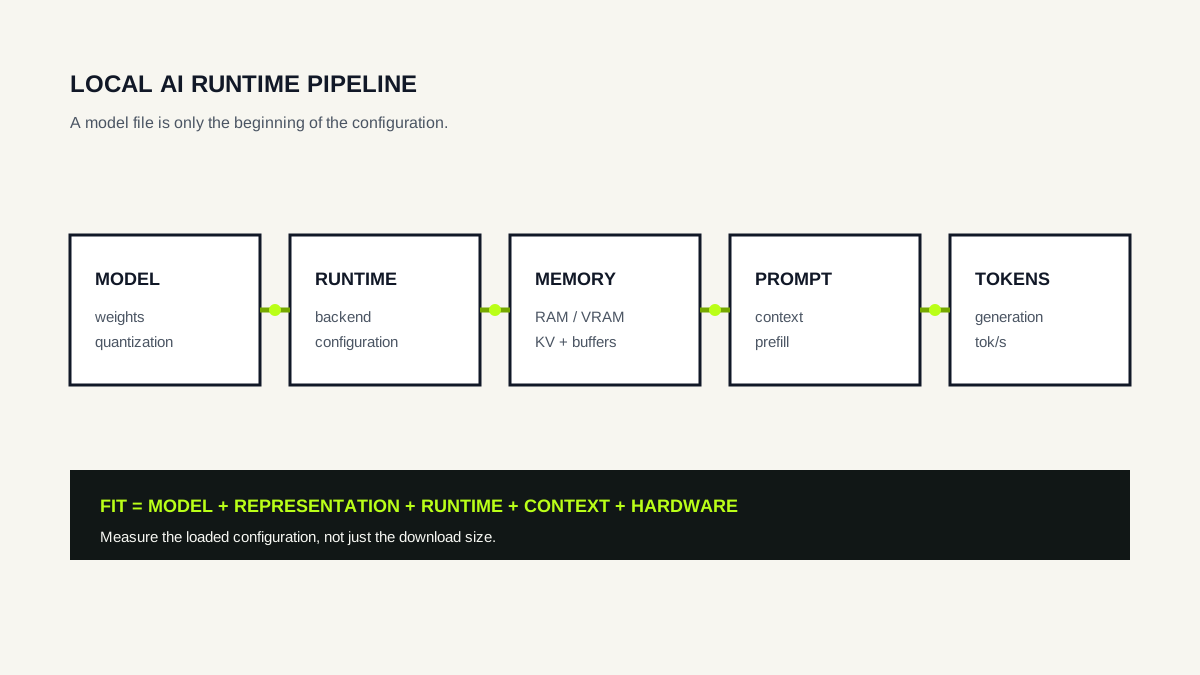
The local inference pipeline
A local language model runs on a computer you control rather than behind a hosted inference API. In practice, the path from download to answer has several stages: choose a model and representation, load it through a runtime, place its weights and working state in available memory, process the prompt, then generate tokens.
Each stage introduces a constraint. A model can be small enough to download but too large for available VRAM. A quantized file can fit in RAM yet generate slowly on a CPU. A model that fits comfortably at a short context can need more memory when the active context is increased.
“Can I run this model?” is not a single specification. It is a question about a complete configuration: model + representation + runtime + context + hardware + workload.
1. Choose the model and representation
Start with the task. A coding assistant, general chat model and embedding model solve different problems. Then inspect the model's parameter scale, supported context and the representation distributed by the runtime or model repository.
For weight-quantized local LLMs, lower-bit representations can substantially reduce the memory occupied by weights. That does not make every other runtime allocation shrink by the same ratio. Context state, temporary buffers and backend overhead remain part of the memory budget.
If you are comparing parameter counts and precisions before choosing a concrete download, use the Model Size & Memory Explorer. For a concrete GGUF or Ollama artifact, the VRAM Calculator is the more deployment-oriented tool.
2. Choose a runtime and backend
The runtime is the software that loads the model and executes inference. Ollama, llama.cpp and other local runtimes differ in model support, hardware backends, configuration and user interface.
A runtime also determines whether your GPU can be used effectively. Hardware support is therefore a software question as well as a GPU-specification question. Before buying hardware for a particular workflow, verify that the intended runtime has a mature backend for it.
Our current E—DOCEO Lab uses Ollama because it exposes a reproducible local API and reports active context and CPU/GPU placement through ollama ps. That choice describes the test environment; it is not a claim that one runtime is universally preferable.
3. Fit the runtime memory budget
Think in two memory pools: system RAM and, when a discrete GPU is used, VRAM. A fully GPU-resident configuration needs enough VRAM for the GPU-side allocations. CPU-only and partially offloaded configurations can use system RAM for model data that is not resident on the GPU.
The downloaded file size is useful evidence, but it is not the complete runtime requirement. Our Qwen3 4B Q4_K_M experiment is a concrete example: the download was about 2.5 GB, while Ollama reported a runtime SIZE of about 3.5 GB at active context 4096. On the 3 GB GTX 1060 test system, Ollama reported 57% CPU / 43% GPU placement.
That observation is specific to the tested model, runtime and machine. It demonstrates why “file size < VRAM” should not be treated as a universal fit test.
4. Set context deliberately
The context window is the token history available to the model for a request. The model may support a large maximum, while the runtime is configured to allocate a smaller active context.
Context-related state such as the KV cache can consume additional memory. The exact relationship depends on architecture, precision and runtime implementation. More configured context is therefore not free, but its practical cost cannot be inferred from parameter count alone.
Our Gemma 3 1B context-length Lab tested active contexts from 1K through 32K on the same 3 GB GPU. Generation throughput stayed nearly flat for the short benchmark prompt, but that experiment did not fill a 32K prompt and should not be read as a long-context quality or full-context stress test.
5. Measure the configuration you actually use
Once the model runs, record the configuration rather than only the subjective result. At minimum, keep the exact model and quantization, runtime version, active context, CPU/GPU placement, generation tokens per second and whether the measurement is cold or warm.
This turns “it works on my PC” into evidence that can be reproduced and compared after a runtime update, model change or hardware upgrade.
A useful next step is choosing a model for your hardware, where these constraints become a selection workflow rather than a list of specifications.