GPU Offloading in Ollama: What It Actually Means
A model does not have to fit entirely in VRAM to run in Ollama. Learn what full GPU loading and partial CPU/GPU placement mean, what Ollama actually reports, and how to diagnose a slow local model without confusing file size, runtime size and VRAM.
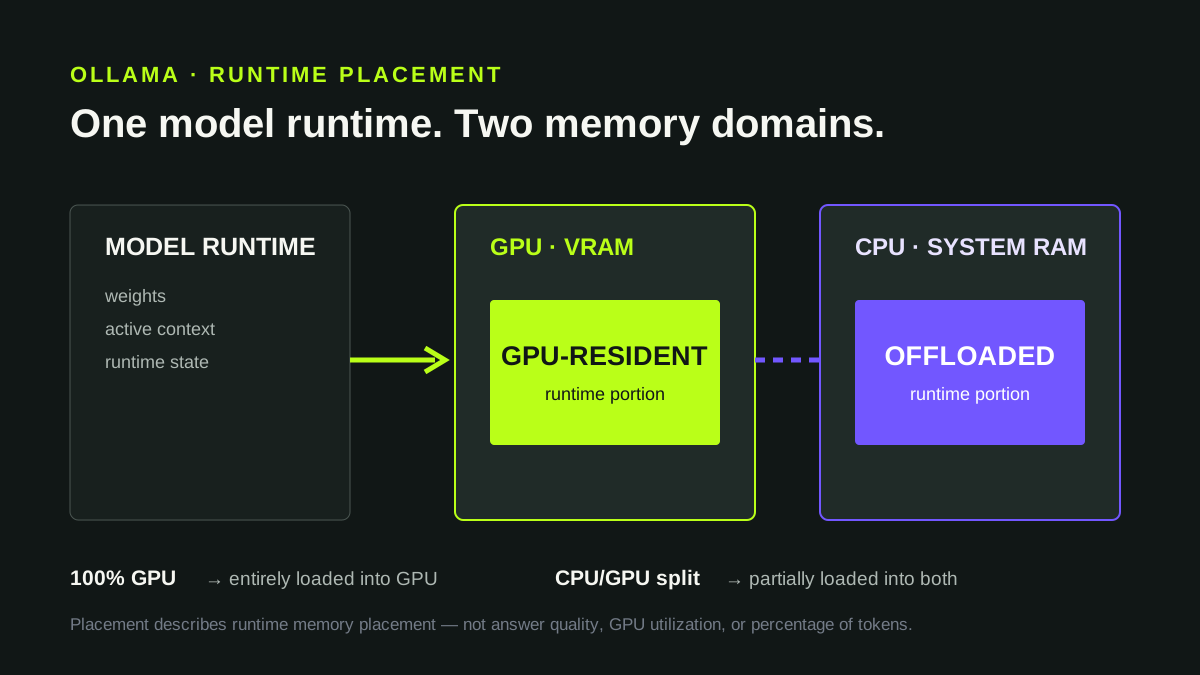
What GPU offloading means in Ollama
When Ollama loads a local model, the runtime has to place the model and its active inference state in memory that the available compute devices can use. If the loaded configuration is entirely on the GPU, Ollama can report it as 100% GPU. If it is split between GPU and system memory, ollama ps can report a CPU/GPU split such as 48%/52% CPU/GPU.
Ollama's current FAQ defines the PROCESSOR column in exactly this operational way: 100% GPU means the model was loaded entirely into the GPU, 100% CPU means it was loaded entirely in system memory, and a split means it was loaded partially into both memory domains.
This is the practical meaning of offloading here: the runtime can use the GPU for part of a model configuration even when the complete loaded configuration is not resident in GPU memory. It is not a promise that every oversized model will run well, and the placement percentage is not a direct percentage of elapsed compute time or generated tokens.
Offloading changes where the loaded model configuration resides. It does not make system RAM equivalent to VRAM, and it does not remove the compute cost of a larger model.
How to check whether Ollama is using the GPU
With a model loaded, start with:
ollama psA simplified result can look like this:
NAME        SIZE     PROCESSOR        CONTEXT
model       3.5 GB   57% CPU/43% GPU 4096
The important diagnostic fields are the loaded runtime size, processor placement and active context. Do not compare only the size shown by ollama list or the download progress with nominal GPU VRAM and assume they describe the same allocation.
For applications and repeatable measurements, Ollama also exposes the loaded models through its local API. For a field-by-field diagnostic walkthrough, see How to Check Model Memory Usage in Ollama.
The endpoint is:
curl http://localhost:11434/api/psThe documented /api/ps response includes size, size_vram and context_length for each running model. E—DOCEO LAB #005 recorded these API fields after generation rather than reconstructing them later.
Downloaded size, runtime size and size_vram are different
Three numbers are easy to confuse:
Downloaded/model artifact size describes data stored for the model. Runtime size is what Ollama reports for the currently loaded model. size_vram is the VRAM-side size field exposed for that running model by /api/ps.
The runtime can also allocate context-related state and other working memory. Ollama documents num_ctx as the API setting for active context, and its FAQ notes that memory requirements can grow with context and parallel processing. This is one reason a model's stored file size is not a complete GPU-fit test.
downloaded model size < GPU VRAM → 100% GPUThe comparison ignores the loaded runtime configuration. Load the model and inspect the runtime instead.
Measured example: three models on a GTX 1060 3GB
On September 25, 2026, E—DOCEO tested three local model configurations on the same Windows 10 machine with a GeForce GTX 1060 3GB, the same prompt and an active context of 4096. Each model received one cold run and three warm runs.
| Model | Ollama runtime size |
size_vram |
size_vram / size |
Warm median |
|---|---|---|---|---|
| Gemma 3 1B | 0.877 GB | 0.877 GB | 100% | 64.46 tok/s |
| Qwen3 1.7B | 1.900 GB | 1.462 GB | 76.9% | 48.75 tok/s |
| Qwen3 4B | 3.525 GB | 1.501 GB | 42.6% | 9.44 tok/s |
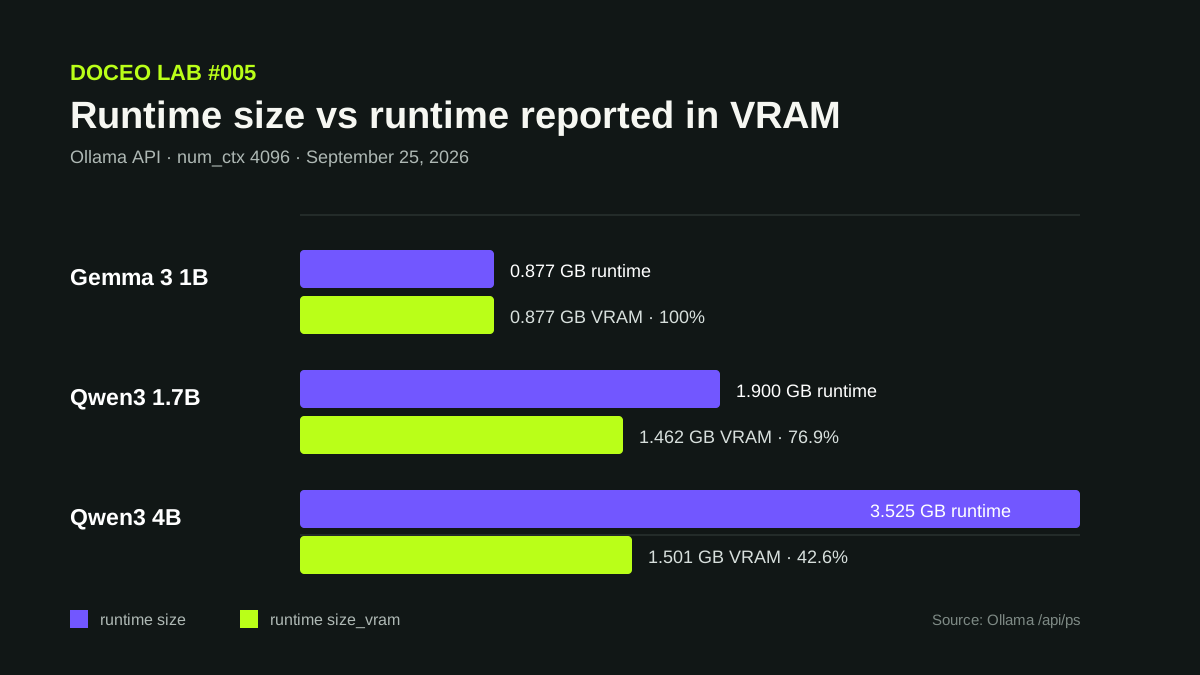
size_vram / size; it is not GPU utilization and is not a percentage of computation.The intermediate Qwen3 1.7B result is useful because it shows that partial placement is not automatically synonymous with unusable performance. Its median warm generation rate remained 48.75 tok/s in this short-prompt test. Qwen3 4B, whose runtime was much larger while size_vram stayed near 1.5 GB, measured 9.44 tok/s.
That does not isolate an “offloading penalty.” The models differ in parameter count and compute requirements, and Gemma belongs to a different model family. Even the Qwen3 1.7B-to-4B comparison changes model size at the same time as runtime placement. The measurements show the observed runtime states and throughput; they do not prove a single cause for the speed difference.
Open the complete LAB #005 methodology, all 12 runs and raw-data archives →
A practical diagnostic workflow when a model is slow
Start by loading the exact model and checking ollama ps. Record its runtime size, PROCESSOR split and active context. If you need machine-readable evidence, query /api/ps and keep size, size_vram and context_length with the test result.
Then separate load latency from generation throughput. A cold request includes model loading; repeated warm requests largely remove that cost. For generation speed, record generated-token count and generation duration rather than comparing total request time across outputs of different lengths.
If the resulting speed is not useful, test one controlled change at a time: a smaller model, another quantization where appropriate, a smaller active context if the workload allows it, or a different supported hardware/runtime configuration. Re-run the same prompt before drawing a conclusion.
For model selection before the download, use the Model Size & Memory Explorer. For a concrete deployment estimate, use the VRAM Calculator. Treat both as planning tools; the loaded runtime remains the final fit test.
What offloading data does not tell you
A CPU/GPU placement value does not measure answer quality. size_vram / size is not the same thing as GPU utilization, percentage of operations executed by the GPU, or percentage of time spent on the GPU. Tokens per second also depends on model architecture, model size, quantization, context, hardware, backend and workload.
The LAB #005 numbers are therefore evidence for one documented GTX 1060 3GB environment, not a universal cutoff for all 3 GB GPUs. The benchmark used a short prompt with num_ctx: 4096; it did not fill a 4096-token context and was not a long-context stress test.
For the runtime-independent concept, continue with Model Offloading for Local LLMs. For choosing a configuration from hardware constraints, use Choose a Local AI Model for Your Hardware.