Model Offloading for Local LLMs
When a model does not fit fully in VRAM, local runtimes can split work and model data between GPU and system memory. That makes constrained GPUs useful — but placement percentages need careful interpretation.
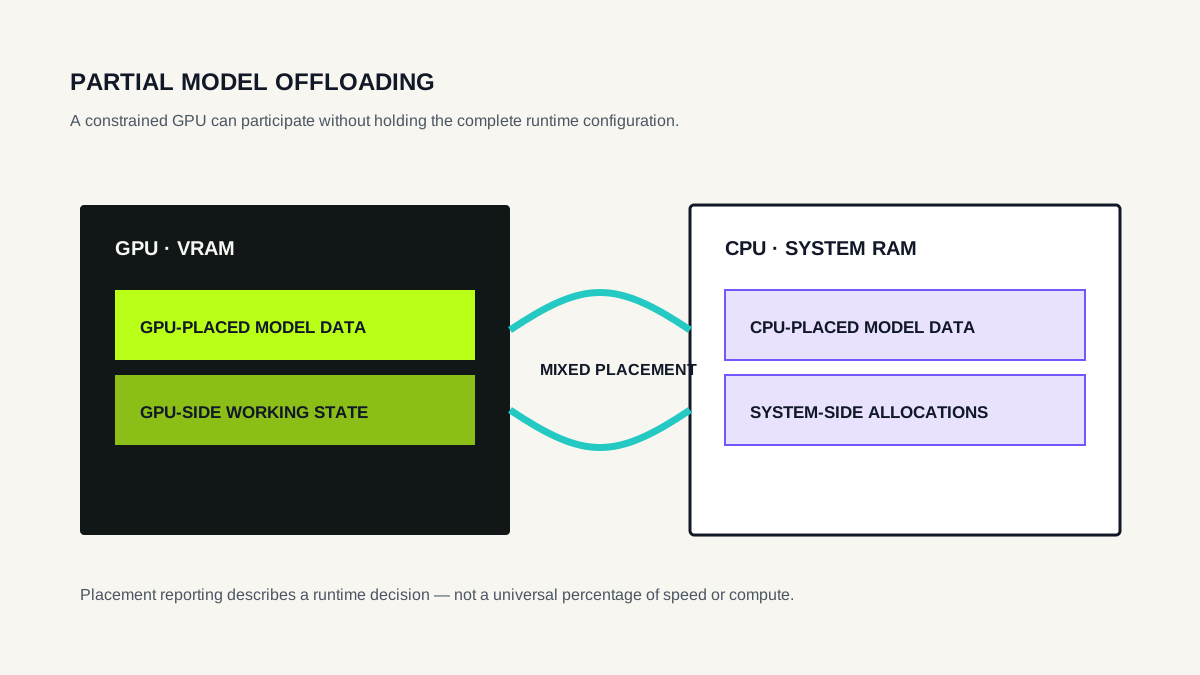
Why model offloading exists
A discrete GPU can accelerate local inference, but its VRAM is finite. If a runtime configuration cannot reside fully on the GPU, a local inference engine may keep part of the model or workload on the CPU side while placing another part on the GPU.
This is particularly useful on older or low-VRAM hardware. Instead of a binary outcome — “fits on GPU” or “cannot run” — partial offload creates a middle state in which the GPU still contributes while system RAM provides additional capacity.
Offloading does not create memory. The machine still needs enough combined resources for the configuration, and moving or coordinating work across CPU and GPU can affect throughput.
What does a CPU/GPU placement percentage mean?
Placement reporting is runtime-specific. In Ollama, ollama ps exposes a PROCESSOR field that can show states such as 100% GPU or a CPU/GPU split. This is useful operational evidence about the loaded model.
It should not automatically be interpreted as a precise percentage of tokens, elapsed time, compute operations or physical VRAM consumption. Those are different measurements.
Treat a runtime's placement percentage as a description of that runtime's placement decision. Do not convert it into a performance percentage unless the runtime documentation explicitly defines such a relationship.
Why partial offload can change performance
GPU-resident tensor operations can benefit from the GPU's parallel compute and memory bandwidth. CPU-resident portions use a different compute path and system memory. A mixed configuration also has coordination and data-movement costs.
The resulting tokens per second depend on more than the placement ratio: model architecture and size, quantization, CPU and GPU, memory bandwidth, backend implementation, context and prompt behavior all matter.
This is why two different models should not be used to derive a universal “offload penalty.” A controlled test would need to vary placement while holding the model, prompt, runtime and other relevant settings constant.
Measured example: Qwen3 4B on a 3 GB GPU
E—DOCEO Lab #002 ran Qwen3 4B Q4_K_M with Ollama 0.34.2 on a GTX 1060 3GB. At active context 4096, ollama ps reported a runtime size of about 3.5 GB and placement of 57% CPU / 43% GPU. Across three recorded runs, median generation throughput was 12.16 tok/s.
Reducing active context changed the reported placement slightly: 55% CPU / 45% GPU at 2048 and 53% CPU / 47% GPU at 1024. Median generation throughput in those configurations was 13.25 tok/s and 13.49 tok/s, respectively.
These observations establish what happened in that environment. They do not isolate context length as the sole cause of the throughput difference, and three runs per configuration are too small a sample for a broad hardware claim.
Open the complete Lab #002 methodology and results →
A later three-model experiment extends this evidence with Gemma 3 1B, Qwen3 1.7B and Qwen3 4B under one 4096-context protocol. Open LAB #005 →
How to use offloading information
For Ollama specifically, the practical guide GPU Offloading in Ollama explains runtime placement. The companion Ollama memory usage guide shows how to record ollama ps, /api/ps, runtime size, size_vram and context without conflating them.
Use placement as a diagnostic signal. If the model is partially offloaded, ask whether the achieved speed is acceptable for the workload. If it is not, possible levers include a smaller model, a more aggressive weight quantization, a smaller active context when appropriate, a runtime/backend change, or hardware with more usable VRAM.
Do not optimize for 100% GPU as an end in itself. The practical target is a configuration that fits, remains stable and provides acceptable output quality and latency for the task.