Local Model
Fit Checker.
Turn model size, context, VRAM and system RAM into a transparent planning signal: likely GPU fit, partial offload, RAM-heavy execution, or an insufficient combined budget.
Calculating…
This tool does not predict Ollama's exact layer placement. Architectures, runtimes, drivers, KV-cache implementations and other allocations can change real memory use. Use the result to choose what to test, then verify the loaded model.
A fit estimate you can inspect
The checker separates four things that are often collapsed into one number: model weights, a context allowance, runtime reserve and hardware headroom. If you know the real model artifact size, use it. Parameter mode instead uses the simple theoretical baseline parameters × nominal bits ÷ 8.
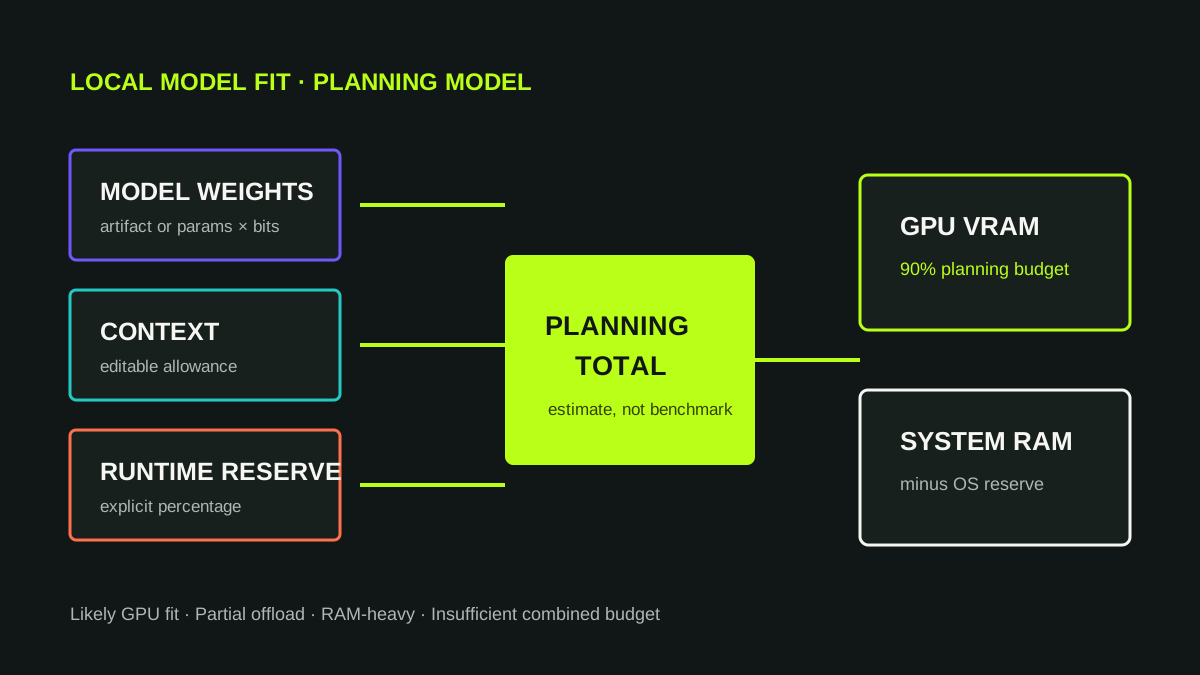
How the signal is assigned
The planning total is weights + editable context allowance + runtime reserve. The checker keeps 10% of entered VRAM as GPU headroom and subtracts the OS reserve from system RAM. If the total fits inside the remaining GPU budget, it reports a likely GPU fit. If it needs both memory pools, it reports partial offload; when less than one quarter of the planning total fits in the GPU budget, it flags the plan as RAM-heavy. If the combined planning budget is too small, it reports insufficient memory.
Those thresholds are heuristics, not runtime facts. For a concrete Ollama process, inspect model memory usage and read what GPU offloading actually means.
Why downloaded size is not runtime memory
A model artifact is only one part of a loaded runtime. Context/KV state, buffers and runtime allocations add memory, and placement can be split between GPU and CPU. Our LAB #005 measured this directly on a 3GB GTX 1060: the Qwen3 4B download was about 2.5GB, while Ollama reported a 3.525GB runtime size and 1.501GB in size_vram. That is evidence for the distinction, not a universal multiplier.
What to do after the estimate
Use the checker to narrow the configuration, then load the model and verify it. If it is slower than expected, compare the runtime placement, context and model size. For architecture-aware KV planning, use the Local LLM VRAM Calculator; for theoretical precision comparisons, use the Model Size & Memory Explorer.